



Tally to ERPNext Migration Saudi Arabia: Move Without Losing Data
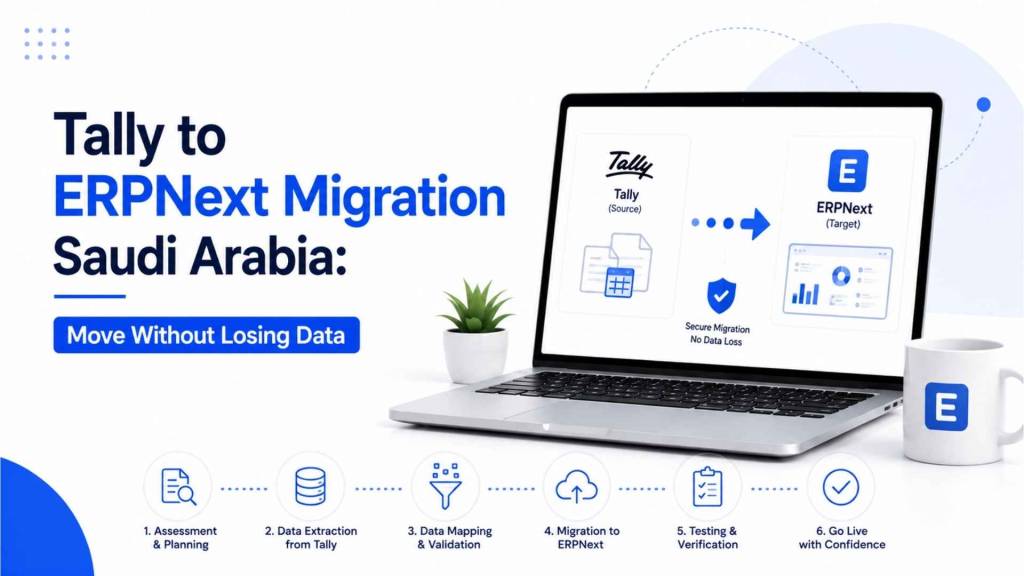
The single most common fear we hear from a Saudi business considering a move from Tally to ERPNext is not whether ERPNext is the better long-term platform. It usually is, for a business that has outgrown pure accounting software. The fear is losing years of financial history in the process, ledgers, stock valuations, and outstanding balances that a business genuinely cannot afford to get wrong. This guide is about exactly that concern: what needs to move, in what order, and how to confirm nothing has been lost before you switch off Tally for good.
Quick Answer: How Do You Migrate from Tally to ERPNext Without Losing Data?
Migrating from Tally to ERPNext without data loss means exporting your master data first (chart of accounts, customers, suppliers, stock items, opening balances), mapping Tally’s flatter account structure to ERPNext’s hierarchical chart of accounts before importing anything, then bringing in transactional history in chronological order, and reconciling your trial balance and stock valuation in ERPNext against Tally to the last riyal before you cut over. Businesses that skip the mapping and reconciliation steps are the ones who end up with duplicate ledgers or mismatched balances after go-live.
Key Takeaways
- Masters must migrate before transactions, since every voucher and invoice references a ledger, customer, supplier, or stock item that needs to already exist in ERPNext.
- Tally’s chart of accounts is flatter than ERPNext’s hierarchical account tree, and this mapping step is where most migrations go wrong if it is rushed or skipped.
- The best time to cut over is at a financial year-end or, at minimum, a quarter-end, since mid-year migrations split a single reporting period across two systems and complicate reconciliation.
- A parallel run, operating both systems side by side for a defined period, is the only reliable way to confirm ERPNext’s trial balance matches Tally before you fully switch off the old system.
- Not every business should migrate. If your operation is a straightforward single-branch business with no plans to add inventory complexity, manufacturing, or multi-branch operations, staying on TallyPrime may still be the right call, and our TallyPrime implementation guide for Riyadh covers that path.
Why Saudi Businesses Move from Tally to ERPNext
TallyPrime is genuinely strong, straightforward accounting software, and for a business that only needs accounting, it often remains the right tool. The businesses that move to ERPNext are usually the ones that have outgrown that scope: they now need manufacturing or production planning, multi-branch inventory visibility across cities, HR and payroll in the same system as finance, or CRM data connected to the same platform as invoicing. ZATCA e-invoicing adds another layer to this decision, since a business processing invoices across multiple departments benefits from having compliance built into a single connected system rather than an accounting tool sitting apart from operational data.
What Actually Needs to Migrate
Master Data (Migrate First)
Master data is the foundation everything else references, and it must exist in ERPNext before any transactional data is imported. This includes your chart of accounts, customer and supplier records, stock items and units of measure, and cost centers.
Opening Balances
Opening balances for every ledger, customer, and supplier account need to be brought across accurately, since these form the starting point every subsequent report in ERPNext will be measured against.
Transactional History
Sales invoices, purchase invoices, journal entries, and other vouchers should be imported in chronological order after masters are in place, preserving the actual sequence of your financial trail rather than importing everything at once out of order.
The Migration Process, Step by Step
- Export your data from Tally. Tally supports XML and CSV export for ledgers, stock items, and vouchers, typically through Gateway of Tally’s export functions. Export chart of accounts, customer and supplier masters, stock items, and at least two years of voucher history.
- Map your chart of accounts before importing anything. Tally’s account groups are flatter than ERPNext’s hierarchical structure of Assets, Liabilities, Income, and Expenses. Build this mapping in a spreadsheet first; attempting a direct import without mapping is the most common cause of duplicated or misclassified accounts.
- Set up your ERPNext company correctly. Configure fiscal year, VAT settings, and payment terms in ERPNext before importing any data, since these settings affect how imported records are interpreted.
- Import master data. Use ERPNext’s built-in Data Import tool, or a dedicated Tally XML import workflow where available, to bring in chart of accounts, customers, suppliers, and stock items first.
- Import transactional history in order. Bring in vouchers and invoices chronologically so the financial trail remains intact and auditable.
- Reconcile trial balance and stock valuation. Before going live, confirm that ERPNext’s trial balance and stock valuation match Tally’s exactly. This is the single most important verification step in the entire process.
- Run both systems in parallel. Operate Tally and ERPNext side by side for two to four weeks, entering transactions in both and comparing outputs, before switching Tally off.
- Re-test ZATCA e-invoicing after cutover. Once ERPNext is live, confirm invoice generation and Fatoora integration are working correctly against your actual invoice templates before relying on it fully.
Why Timing the Cutover Matters
Migrate at a financial year-end, or at minimum a quarter-end, wherever possible. Mid-year migrations split a single reporting period across two systems, which turns a manageable reconciliation exercise into a genuinely difficult one, particularly for VAT reporting periods that need to tie out cleanly. If a year-end cutover is not realistic, a quarter-end is the next best option, but every open transaction at the cutover point needs to be documented carefully rather than assumed to carry across automatically.
Common Data Integrity Risks and How to Avoid Them
- Direct import without chart of accounts mapping, which creates duplicate or misclassified accounts that are difficult to untangle after the fact.
- Skipping the trial balance reconciliation step, which means discrepancies only surface weeks or months later, once they are harder to trace back to their source.
- Importing transactions out of chronological order, which can distort running balances and ageing reports.
- Migrating mid-year without documenting open transactions, leaving partial-year data split awkwardly across two systems.
- Assuming ZATCA e-invoicing will work identically in ERPNext without re-testing, when invoice templates and integration settings need to be reconfirmed on the new platform.
Common Mistakes We See Saudi Businesses Make
- Rushing the migration to hit an internal deadline without allowing time for proper account mapping.
- Treating the parallel run as optional rather than the primary safeguard against cutover errors.
- Not involving the finance team early enough to validate that opening balances and ledger mappings are actually correct, not just technically imported.
- Assuming migration tools alone guarantee accuracy, when the mapping and reconciliation discipline around them is what actually prevents data loss.
Best Practices for a Clean Migration
- Build your chart of accounts mapping in a spreadsheet before touching ERPNext at all.
- Export at least two full financial years of Tally voucher history, not just the current year, to preserve comparative reporting.
- Insist on trial balance and stock valuation reconciliation to the last riyal before considering the migration complete.
- Keep a documented rollback plan in case a serious discrepancy surfaces during the parallel run.
- Re-test ZATCA e-invoicing in ERPNext specifically, rather than assuming compliance carries over automatically from Tally.
If You Are Not Sure Migration Is Right for You
Not every Tally user needs to move to ERPNext. If your business is a single-branch operation with straightforward accounting needs and no near-term plans for manufacturing, multi-branch inventory, or integrated HR, staying on TallyPrime and simply ensuring it is properly licensed and supported may be the more sensible choice. Our TallyPrime dealer guide for Saudi Arabia and our main TallyPrime sales and solutions page cover that path if migration turns out not to be the right call for your business right now.
Illustrative Case Study: A Riyadh Distribution Business
A distribution business running TallyPrime across a single Riyadh location had reached a point where multiple staff needed simultaneous access to stock and finance data, something Tally’s desktop-oriented setup made increasingly awkward as the team grew. Before migration, we built a full chart of accounts mapping and exported two years of voucher history for comparative reporting. The parallel run surfaced a handful of misclassified ledger accounts early, which we corrected before cutover rather than after, and the trial balance reconciled exactly before Tally was retired. The business went live on ERPNext with its full financial history intact and no gap in reporting continuity across the transition.
Expert Insight
“The migrations that go wrong are almost never a technical export or import failure, they are a mapping and discipline failure, someone imported data before the chart of accounts was properly mapped, or skipped the reconciliation step to save time,” says Mohamed Abdul Baseeth, Founder of Maas Consult Middle East Co, who has guided ERP implementations and migrations for over 2,000 businesses across Saudi Arabia. “We work with both platforms directly, which is also why we followed Tally Solutions’ own Managing Director, Tejas Goenka, on his Riyadh visit so closely; understanding Tally properly from the inside is exactly what makes a clean migration off it possible.”
Frequently Asked Questions
Will I lose my financial history when migrating from Tally to ERPNext?
Not if the migration follows the correct sequence: masters first, then chronological transactional history, with trial balance and stock valuation reconciled against Tally before cutover. Data loss in these migrations is almost always a process failure, not a technical limitation of either platform.
What data needs to be exported from Tally before migration?
Chart of accounts, customer and supplier masters, stock items and units of measure, opening balances, and at least two years of voucher history covering sales invoices, purchase invoices, and journal entries.
Why is chart of accounts mapping so important in this migration?
Tally’s account structure is flatter than ERPNext’s hierarchical tree of Assets, Liabilities, Income, and Expenses. Importing data directly without mapping these structures first is the most common cause of duplicated or misclassified accounts after migration.
How long does a Tally to ERPNext migration typically take?
This depends on data volume and complexity, but a parallel run of two to four weeks is standard practice before fully retiring Tally, in addition to the time needed for export, mapping, and initial import.
When is the best time to cut over from Tally to ERPNext?
At a financial year-end, or at minimum a quarter-end. Migrating mid-year splits a single reporting period across two systems and complicates reconciliation, particularly for VAT reporting.
Do I need to re-test ZATCA e-invoicing after migrating to ERPNext?
Yes. Invoice generation and Fatoora integration should be tested against your actual invoice templates in ERPNext specifically, rather than assumed to carry over automatically from however it was configured in Tally.
Can I migrate only part of my Tally data, such as the current year?
You can, but exporting at least two full financial years is recommended to preserve comparative reporting in ERPNext rather than starting your new system with a reporting gap.
What is a parallel run and why does it matter?
A parallel run means operating both Tally and ERPNext simultaneously for a defined period, entering transactions in both and comparing the outputs. It is the most reliable way to confirm ERPNext produces the same financial results as Tally before switching the old system off.
Should every TallyPrime user migrate to ERPNext eventually?
No. Businesses with straightforward, single-branch accounting needs and no plans for manufacturing, multi-branch inventory, or integrated HR often continue to be well served by TallyPrime. Migration makes sense once a business has genuinely outgrown that scope.
Who can help with a Tally to ERPNext migration in Saudi Arabia?
Our team handles the full migration process, from chart of accounts mapping through parallel run and reconciliation. If you are still deciding between migrating and staying on TallyPrime, our TallyPrime implementation guide for Riyadh can help clarify which path fits your business.
Plan Your Tally to ERPNext Migration
If you are considering a move from Tally to ERPNext and want to make sure your financial history comes across intact, get in touch to start with a data mapping assessment. If you decide TallyPrime still fits your business for now, our TallyPrime dealer page for Saudi Arabia and TallyPrime sales and solutions page are the right starting points instead. Reach out through maasconsult.co/contact-us/ to discuss which path fits your business.


4 Comments